Shopify Flow Integration
Zubs integrates natively with Shopify Flow, Shopify's built-in automation builder. This lets you trigger workflows based on subscription events and control subscriptions from within your Flow automations — without any custom code.
What you can do
React to subscription events — Zubs fires triggers into Shopify Flow when things happen to a subscription (created, renewed, cancelled, etc.). You can connect these to any action available in Flow: send an email, add a customer tag, notify a Slack channel, create a task in your helpdesk, and more.
Zubs already tags customers automatically with zubs-active-subscriber and zubs-inactive-subscriber based on their subscription status — no Flow setup needed. See Customer tags for details.
Control subscriptions from Flow — Zubs exposes actions that Flow can call. You can cancel a subscription, skip the next billing cycle, add a free one-time item to the next order, or look up a customer's subscription contracts — all from within a Flow automation.
Available triggers and actions
| Type | Name | Description |
|---|---|---|
| Trigger | Subscription Created | A new subscription contract is activated |
| Trigger | Subscription Cancelled | A subscription is cancelled |
| Trigger | Renewal Successful | A billing attempt succeeds and a renewal order is created |
| Trigger | Billing Failure | A billing attempt fails (payment or inventory) |
| Trigger | Order Skipped | A billing cycle is skipped |
| Trigger | Upcoming Order Reminder | An upcoming order reminder email is sent to a customer |
| Trigger | Subscription Items Updated | The line items on a subscription are changed |
| Trigger | Frequency Changed | The billing frequency of a subscription is changed |
| Action | Cancel Subscription | Cancels a subscription, optionally recording a reason |
| Action | Skip Next Billing Cycle | Skips the next upcoming billing cycle |
| Action | Add Free One-Time Item | Adds a free product variant to the next billing cycle |
| Action | Fetch Subscription Contracts | Returns a customer's subscription contracts, active only or all |
Triggers
Zubs fires the following triggers into Shopify Flow. Each trigger carries a set of properties you can use in your Flow conditions and actions.
Subscription Created
Fires when a new subscription contract is activated.
| Property | Description |
|---|---|
Subscription contract id | GID of the subscription contract |
Customer | The subscribing customer |
Subscription Cancelled
Fires when a subscription is cancelled.
| Property | Description |
|---|---|
Subscription contract id | GID of the subscription contract |
Customer | The customer whose subscription was cancelled |
Renewal Successful
Fires when a billing attempt succeeds and a renewal order is created.
| Property | Description |
|---|---|
Subscription contract id | GID of the subscription contract |
Customer | The customer |
Order | The renewal order |
Billing Failure
Fires every time a billing attempt fails — the first attempt and each dunning retry, whether the cause is the payment or missing inventory. The trigger doesn't say which attempt failed or whether retries remain.
| Property | Description |
|---|---|
Subscription contract id | GID of the subscription contract |
Customer | The customer |
Order Skipped
Fires when a billing cycle is skipped.
| Property | Description |
|---|---|
Subscription contract id | GID of the subscription contract |
Customer | The customer |
Skipped date | Start of the skipped cycle's window (ISO 8601). Shopify discards the billing date the order would have had when a cycle is skipped, so this names the cycle's own start instead. |
Cycle index | Index of the skipped billing cycle |
Upcoming Order Reminder
Fires on each day in the shop's reminder schedule (Settings → Notifications), whether or not the Upcoming Order Reminder email itself is switched on. A shop can configure up to three reminders, and this trigger fires once for each — use Days before billing to tell them apart, or to act on only one of them.
| Property | Description |
|---|---|
Subscription contract id | GID of the subscription contract |
Customer | The customer |
Next billing date | Next scheduled billing date (ISO 8601) |
Days before billing | How many days before the order this reminder was sent |
Subscription Items Updated
Fires when the line items on a subscription are changed.
| Property | Description |
|---|---|
Subscription contract id | GID of the subscription contract |
Customer | The customer |
Frequency Changed
Fires when the billing frequency of a subscription is changed.
| Property | Description |
|---|---|
Subscription contract id | GID of the subscription contract |
Customer | The customer |
New interval | New billing interval unit (e.g. WEEK, MONTH, YEAR) |
New interval count | New billing interval count (e.g. 1, 2, 3) |
Actions
Zubs exposes the following actions that Shopify Flow can call.
Cancel Subscription
Cancels a subscription contract. Optionally records a cancellation reason and a free-text comment in the customer metafield, which appears in the Zubs merchant portal.
| Input | Required | Description |
|---|---|---|
| Subscription Contract ID | Yes | GID or numeric ID of the subscription contract to cancel |
| Cancellation Reason ID | No | Handle of the cancellation reason (see below) |
| Extra Text | No | Free-text comment stored alongside the reason |
Finding the Cancellation Reason ID
The Cancellation Reason ID must match the handle of one of your configured cancellation reasons. The easiest way to get the correct ID is from the Zubs settings page: click the clipboard icon next to any cancellation reason to copy its ID directly to your clipboard.
Skip Next Billing Cycle
Skips the next upcoming billing cycle of a subscription.
| Input | Required | Description |
|---|---|---|
| Subscription Contract ID | Yes | GID or numeric ID of the subscription contract |
Add Free One-Time Item
Adds a free product variant to the next billing cycle of a subscription.
| Input | Required | Description |
|---|---|---|
| Subscription Contract ID | Yes | GID or numeric ID of the subscription contract |
| Product Variant ID | Yes | GID or numeric ID of the product variant to add for free |
| Quantity | No | Number of units to add (defaults to 1) |
Fetch Subscription Contracts
Returns a customer's subscription contracts so later steps in your Flow can use them.
| Input | Required | Description |
|---|---|---|
| Customer ID | Yes | GID or numeric ID of the customer |
| Status filter | No | ACTIVE (default) returns only active contracts; ALL returns every contract |
The action returns count (the number of contracts) and contracts. Each contract carries its id, status, createdAt, nextBillingDate, currency, totalPrice, deliveryInterval, deliveryIntervalCount, and lineItems (each with productId, title, and quantity).
FAQ
How do I fetch subscription contract details inside a Flow?
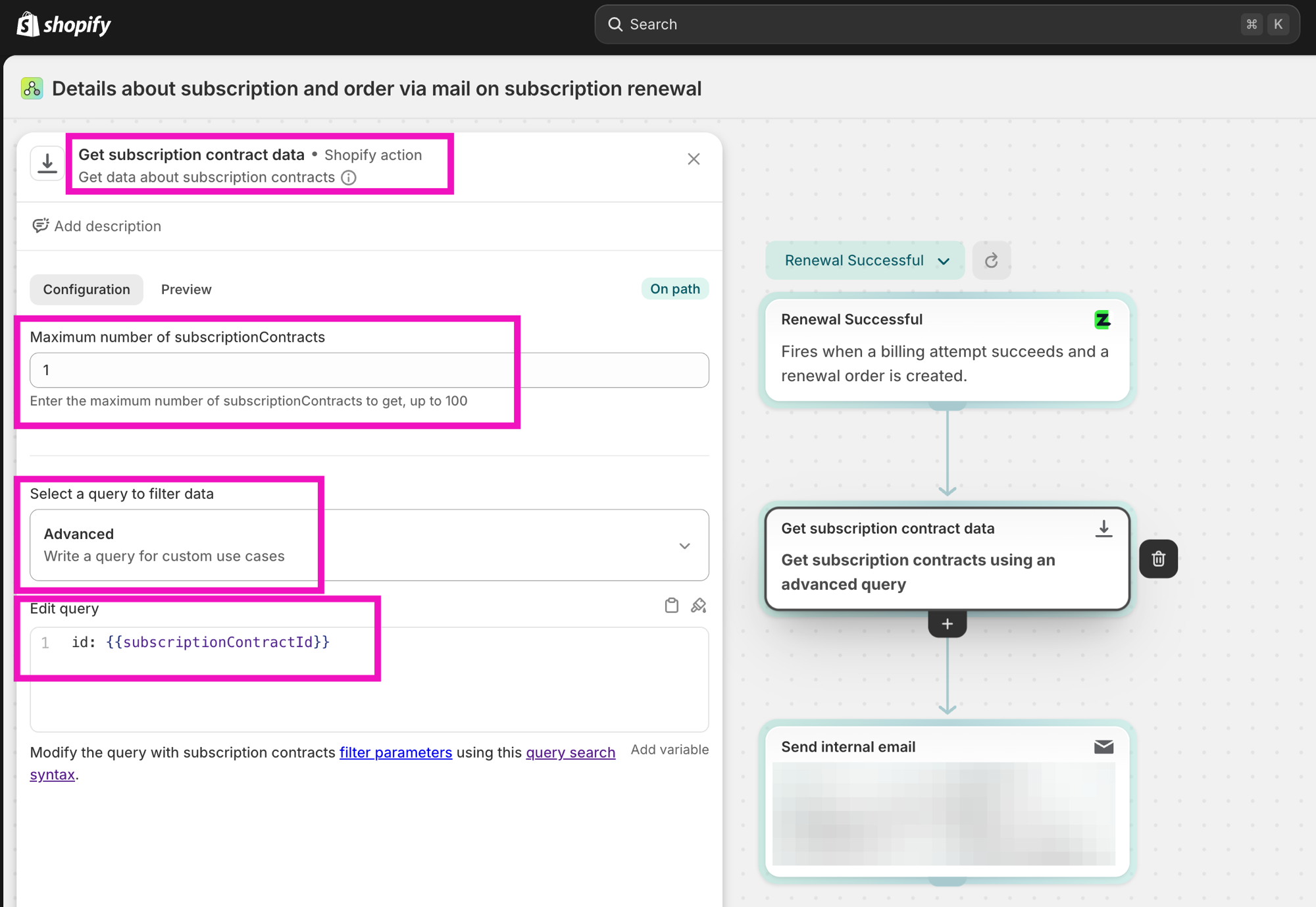
Use the Get subscription contract data action provided by Shopify. This lets you look up the full subscription contract object so you can use its fields (e.g. customer email, line items, billing address) in downstream steps.
Setup:
- Add the Get subscription contract data action to your Flow.
- Set Maximum number of subscriptionContracts to
1. - Under Select a query to filter data, choose Advanced.
- In the Edit query field, enter:
The
id: {{subscriptionContractId}}subscriptionContractIdvariable is available from any Zubs trigger.
Shopify Flow vs. Sequential Flows
Zubs has two automation systems. Here is when to use each:
| Shopify Flow | Sequential Flows | |
|---|---|---|
| Trigger source | Subscription events from Zubs | Specific order number milestones |
| Actions available | Anything in Shopify Flow + Zubs actions | Replace product, apply discount, add free item |
| Use case | Cross-system automation (email, tags, helpdesk, etc.) | Subscription-specific progression (e.g. upgrade on 3rd order) |
| Setup | Shopify Flow app | Zubs merchant portal → Sequential Flows |
For subscription-specific progressions tied to order count (e.g. "give 10% off on the 4th renewal"), use Sequential Flows. For anything that involves other Shopify systems or third-party apps, use Shopify Flow.